| Short
instructions for saving presets: Each zip file will include the.Q5Q
file and the bitmaps needed for the preset.
You may already have
some of the same bitmaps and you will not need to save a new copy. I
chose to include the bitmaps in the zip files because in the past I
have downloaded presets, but did not have the bitmaps I needed to
use those presets. I'd rather be safe than sorry.
Depending on how you
have your BladePro folders set up, will make a difference in where
you choose to extract the files.
I extract the bitmap
(.bmp) files into the environment and texture folders and the preset
((.Q5Q or SBP) files into the SBPpresets folder which I created. If
you have never used BladePro, you can also download BladePro presets
into your presets folder. BUT Super BladePro presets will not work
in regular BladePro. |
 |
|
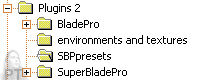
This is a modified screen shot of how my folders are set up.
If yours are set up differently, you do not need to change
yours. This is just what works best for me. |
|